 |
Electronic Components Datasheet Search |
|
|
Electronic Components Datasheet Search |
|
The question interval is too short.
Please try again in a few seconds.

Hello, Please ask a question about WTH100 Datasheet
# Example questions:
➢ What is the range of atmospheric pressure that this weather station can measure?
➢ What does the signal strength indicator display and what do the different levels signify?
➢ How do you manually set the time on the wth100 after removing the batteries?
| Part No. | WTH100 |
| Manufacturer | EXTECH |
| Size | 310 Kbytes |
| Pages | 1 page |
| Description | Radio Controlled Clock and Weather Station |

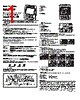

# Extech WTH100 Radio Controlled Wireless Weather Station
## Getting Started
️· Remove battery door: Press latch upwards.
️· Insert two AA batteries (as indicated).
️· Close battery door.
️· Press reset button (back of clock) to initiate radio signal scan.
️· Default Time Zone: Pacific. Change if needed using ▲ key (P=Pacific, M=Mountain, C=Central, E=Eastern).
## Function Keys
️· TIME: Toggle between day/month and year display. Hold to enter time set mode.
️· ALM SET: View/set alarm time. Hold to enter alarm set mode.
️· ALARM On/Off: Slide switch to enable/disable alarm.
️· °C/°F: Select temperature unit. Hold 3 seconds for signal reception test.
️· Mb/hPA/InHg: Display air pressure in various units.
️· SNOOZE/LIGHT: Turns on backlight, turns off alarm in snooze mode (4-minute interval).
## Weather Forecasting & Moon Phase
️· Forecasts weather within 30-50 km (19-31 mile) radius based on barometric pressure trends.
️· Moon phase displayed via icons.
## Signal Strength
️· Indicates signal strength in three levels.
️· Flashing wave segment means time signals are being received.
## Front Panel
1. Snooze/Backlight
2. LCD
3. Time
4. Alarm Set
5. Down
6. Up
7. °C/°F
8. Alarm On/Off
9. Air Pressure
## LCD Display
1. Weather Forecast/Moon Phase
2. Time
3. Temperature
4. Atmospheric Pressure
5. Seconds/Day of Week
6. Time Zone
7. Signal Strength
8. Daylight Savings Time
9. Day/Month/Year/Alarm Time
## Setting the Alarm
1. Press and hold ALM SET.
2. Press ▲ or ▼ to change hour.
3. Press ALM SET. Minute digits flash.
4. Press ▲ or ▼ to change minutes.
5. Press ALM SET to save.
6. Slide ALARM to ON. “Zz” appears.
## Setting Time Manually
1. Remove battery for 30 seconds.
2. Press TIME until HOUR digits flash.
3. Press TIME. Minute digits flash.
4. Press TIME to cycle through Hours, Minutes, Seconds, Year, Month, Date, and Language.
## 12/24 Hour Clock
️· Press - to switch time display format.
## Specifications
️· Battery: 2 x AAA
️· Battery Life: Approx. 1.5 years
️· Pressure Range: 850 mb to 1050 mb
️· Temperature Range: -10°C to 50°C / +14°F to 122°F
## Warranty
️· One-year warranty on parts and workmanship.
️· Six-month limited warranty on sensors and cables.
# Extech WTH100 Radio Controlled Wireless Weather Station
## Getting Started
️· Remove battery door: Press latch upwards.
️· Insert two AA batteries (as indicated).
️· Close battery door.
️· Press reset button (back of clock) to initiate radio signal scan.
️· Default Time Zone: Pacific. Change if needed using ▲ key (P=Pacific, M=Mountain, C=Central, E=Eastern).
## Function Keys
️· TIME: Toggle between day/month and year display. Hold to enter time set mode.
️· ALM SET: View/set alarm time. Hold to enter alarm set mode.
️· ALARM On/Off: Slide switch to enable/disable alarm.
️· °C/°F: Select temperature unit. Hold 3 seconds for signal reception test.
️· Mb/hPA/InHg: Display air pressure in various units.
️· SNOOZE/LIGHT: Turns on backlight, turns off alarm in snooze mode (4-minute interval).
## Weather Forecasting & Moon Phase
️· Forecasts weather within 30-50 km (19-31 mile) radius based on barometric pressure trends.
️· Moon phase displayed via icons.
## Signal Strength
️· Indicates signal strength in three levels.
️· Flashing wave segment means time signals are being received.
## Front Panel
1. Snooze/Backlight
2. LCD
3. Time
4. Alarm Set
5. Down
6. Up
7. °C/°F
8. Alarm On/Off
9. Air Pressure
## LCD Display
1. Weather Forecast/Moon Phase
2. Time
3. Temperature
4. Atmospheric Pressure
5. Seconds/Day of Week
6. Time Zone
7. Signal Strength
8. Daylight Savings Time
9. Day/Month/Year/Alarm Time
## Setting the Alarm
1. Press and hold ALM SET.
2. Press ▲ or ▼ to change hour.
3. Press ALM SET. Minute digits flash.
4. Press ▲ or ▼ to change minutes.
5. Press ALM SET to save.
6. Slide ALARM to ON. “Zz” appears.
## Setting Time Manually
1. Remove battery for 30 seconds.
2. Press TIME until HOUR digits flash.
3. Press TIME. Minute digits flash.
4. Press TIME to cycle through Hours, Minutes, Seconds, Year, Month, Date, and Language.
## 12/24 Hour Clock
️· Press - to switch time display format.
## Specifications
️· Battery: 2 x AAA
️· Battery Life: Approx. 1.5 years
️· Pressure Range: 850 mb to 1050 mb
️· Temperature Range: -10°C to 50°C / +14°F to 122°F
## Warranty
️· One-year warranty on parts and workmanship.
️· Six-month limited warranty on sensors and cables.
| Part No. | WTH100 |
| Manufacturer | EXTECH |
| Size | 310 Kbytes |
| Pages | 1 page |
| Description | Radio Controlled Clock and Weather Station |
| Does ALLDATASHEET help your business so far? [ DONATE ] |
About Alldatasheet | Advertisement | Contact us | Privacy Policy | Link to Datasheet | Link Exchange | Manufacturer List All Rights Reserved©Alldatasheet.com |
| Russian : Alldatasheetru.com | Korean : Alldatasheet.co.kr | Spanish : Alldatasheet.es | French : Alldatasheet.fr | Italian : Alldatasheetit.com Portuguese : Alldatasheetpt.com | Polish : Alldatasheet.pl | Vietnamese : Alldatasheet.vn Indian : Alldatasheet.in | Mexican : Alldatasheet.com.mx | British : Alldatasheet.co.uk | New Zealand : Alldatasheet.co.nz |
|
Family Site : ic2ic.com |
icmetro.com |
 British ▼
  English
 Chinese
 German
 Japanese
 Russian
 Korean
 Spanish
 French
 Italian
 Portuguese
 Polish
 Vietnamese
 Indian
 Mexican
 New Zealand