 |
Electronic Components Datasheet Search |
|
|
Electronic Components Datasheet Search |
|
E32-R21 Datasheet(PDF) 35 Page - Omron Electronics LLC |
|
|
|||||||||||||||||||||||||||||
E32-R21 Datasheet(HTML) 35 Page - Omron Electronics LLC |
|
|
35 / 38 page 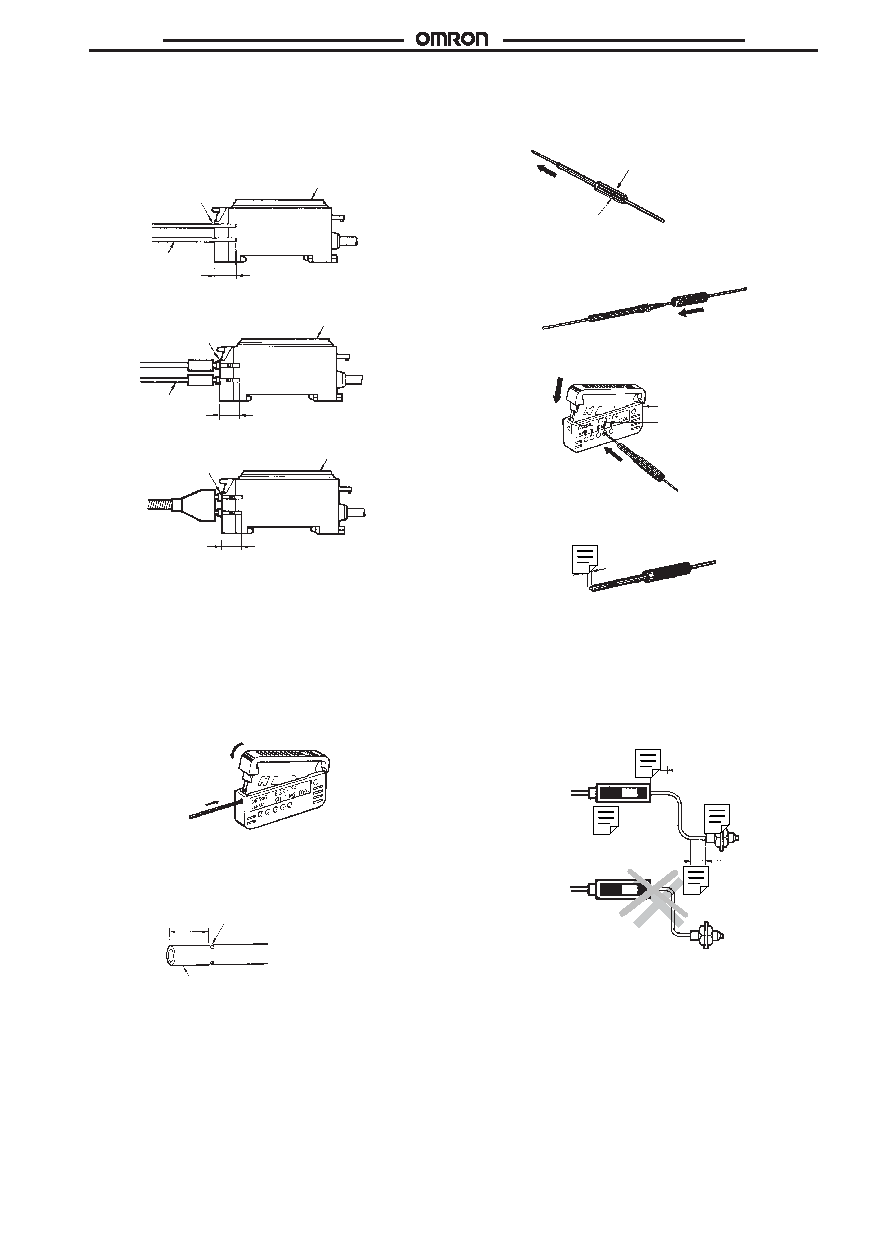 E3X-NH E3X-NH 35 Fiber Insertion If the portion from the tip to the insertion mark of the fibers are not inserted into the Amplifier Unit, the sensing distance will be re- duced. 2.2-mm-dia. Fiber Thin Fiber with the E39-F9 Attachment Fiber with Fixed Length 12.6 mm Fiber Unit Amplifier Unit Insert to the portion from the tip to the insertion mark of each fiber into the Amplifier Unit. Amplifier Unit Fiber Unit 12.6 mm The portion from the tip to the insertion mark of each fiber into the Amplifier Unit. 12.6 mm Amplifier Unit The portion from the tip to the insertion mark of each fiber into the Amplifier Unit. Cutting Fiber Insert a fiber into the Fiber Cutter and determine the length of the fiber to be cut. Press down the Fiber Cutter in a single stroke to cut the fiber. An insertion mark can be placed on the fiber to serve as a reference when inserting the fiber into the Amplifier. Use the following proce- dure. Confirm through the Cutter hole that the fiber is inserted beyond the insertion mark hole so that the insertion mark is properly indicated, and then press firmly down on the Cutter. (2) (1) Insert the fiber into the Amplifier up to the insertion mark. Proper fi- ber performance will not be achieved unless the fiber is inserted all the way to the insertion mark. (This method is applicable to stan- dard, 2.2-mm-diameter fibers only.) 12.6 Insertion mark 2.2-dia. The cutting holes cannot be used twice. If the same hole is used twice, the cutting face of the fiber will be rough and the sensing dis- tance will be reduced. Always use an unused hole. Use either one of the two holes on the right (refer to the following figure) to cut a thin fiber as follows: 1. An attachment is temporarily fitted to a thin fiber before shipment. Temporarily fitted Thin fiber attachment (E39-F9) 2. Secure the attachment after adjusting the position of it in the direction indicated by the arrow. 3. Insert the fiber into the E39-F4 to cut. Three holes for standard fiber (2.2-mm dia.) Cutter E39-F4 Two holes for thin fiber 4. Finished state (proper cutting state) Note: Insert the fiber in the direction indicated by the arrow. Connection Do not pull or press the Fiber Units. The Fiber Units have a with- stand force of 9.8 N (1 kgf) or 29.4 N (3 kgf) (pay utmost attention because the fibers are thin). Do not bend the Fiber Units beyond the permissible bending radius. Do not bend the edge of the Fiber Units (excluding the E32-T jR and E32-D jR). Correct Incorrect Approx. 0.5 mm 20 mm mn. Fiber unit Amplifier unit 20 mm min. |
|
Link URL |
| Does ALLDATASHEET help your business so far? [ DONATE ] |
About Alldatasheet | Advertisement | Contact us | Privacy Policy | Link to Datasheet | Link Exchange | Manufacturer List All Rights Reserved©Alldatasheet.com |
| Russian : Alldatasheetru.com | Korean : Alldatasheet.co.kr | Spanish : Alldatasheet.es | French : Alldatasheet.fr | Italian : Alldatasheetit.com Portuguese : Alldatasheetpt.com | Polish : Alldatasheet.pl | Vietnamese : Alldatasheet.vn Indian : Alldatasheet.in | Mexican : Alldatasheet.com.mx | British : Alldatasheet.co.uk | New Zealand : Alldatasheet.co.nz |
|
Family Site : ic2ic.com |
icmetro.com |
 British ▼
 English
 Chinese
 German
 Japanese
 Russian
 Korean
 Spanish
 French
 Italian
 Portuguese
 Polish
 Vietnamese
 Indian
 Mexican
 British
 New Zealand


