|
Electronic Components Datasheet Search |
|
|
Electronic Components Datasheet Search |
|
H8SX/1663R Datasheet(PDF) 959 Page - Renesas Technology Corp |
|
|
|||||||||||||||||||||||||||||
H8SX/1663R Datasheet(HTML) 959 Page - Renesas Technology Corp |
|
|
959 / 1504 page 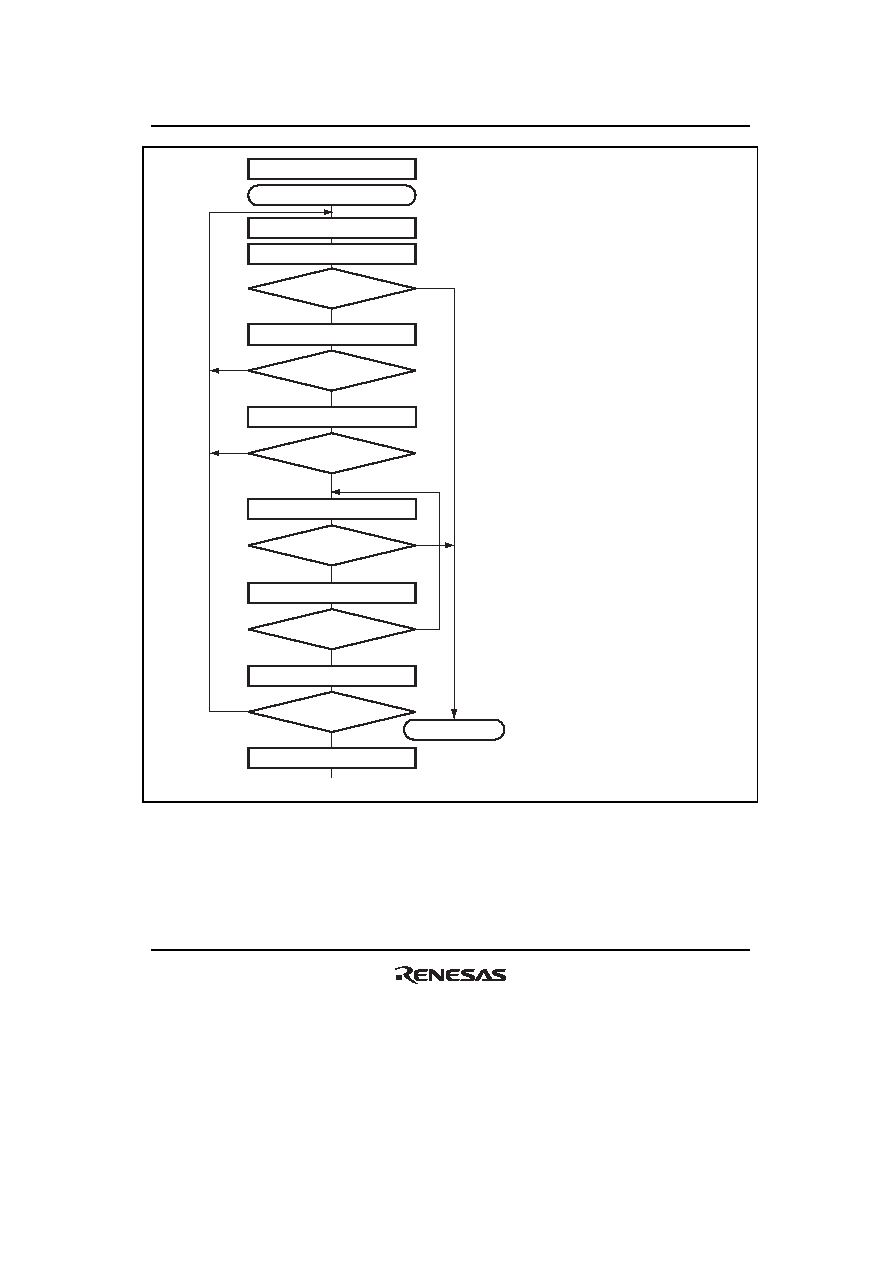 Section 19 Serial Communication Interface (SCI, IrDA, CRC) Rev. 2.00 Sep. 24, 2008 Page 927 of 1468 REJ09B0412-0200 Yes <End> [1] No Initialization Start reception No Yes [4] Clear RE bit in SCR to 0 Error processing (Continued on next page) [5] No Yes FER ∨ ORER = 1 RDRF = 1 All data received? Set MPIE bit in SCR to 1 [2] Read ORER and FER flags in SSR Read RDRF flag in SSR [3] Read receive data in RDR No Yes This station’s ID? Read ORER and FER flags in SSR Yes No Read RDRF flag in SSR No Yes FER ∨ ORER = 1 Read receive data in RDR RDRF = 1 [1] SCI initialization: The RxD pin is automatically designated as the receive data input pin. [2] ID reception cycle: Set the MPIE bit in SCR to 1. [3] SCI state check, ID reception and comparison: Read SSR and check that the RDRF flag is set to 1, then read the receive data in RDR and compare it with this station’s ID. If the data is not this station’s ID, set the MPIE bit to 1 again, and clear the RDRF flag to 0. If the data is this station’s ID, clear the RDRF flag to 0. [4] SCI state check and data reception: Read SSR and check that the RDRF flag is set to 1, then read the data in RDR. [5] Receive error processing and break detection: If a receive error occurs, read the ORER and FER flags in SSR to identify the error. After performing the appropriate error processing, ensure that the ORER and FER flags are both cleared to 0. Reception cannot be resumed if either of these flags is set to 1. In the case of a framing error, a break can be detected by reading the RxD pin value. Figure 19.16 Sample Multiprocessor Serial Reception Flowchart (1) |
|
Link URL |
| Does ALLDATASHEET help your business so far? [ DONATE ] |
About Alldatasheet | Advertisement | Contact us | Privacy Policy | Link to Datasheet | Link Exchange | Manufacturer List All Rights Reserved©Alldatasheet.com |
| Russian : Alldatasheetru.com | Korean : Alldatasheet.co.kr | Spanish : Alldatasheet.es | French : Alldatasheet.fr | Italian : Alldatasheetit.com Portuguese : Alldatasheetpt.com | Polish : Alldatasheet.pl | Vietnamese : Alldatasheet.vn Indian : Alldatasheet.in | Mexican : Alldatasheet.com.mx | British : Alldatasheet.co.uk | New Zealand : Alldatasheet.co.nz |
|
Family Site : ic2ic.com |
icmetro.com |
 British ▼
 English
 Chinese
 German
 Japanese
 Russian
 Korean
 Spanish
 French
 Italian
 Portuguese
 Polish
 Vietnamese
 Indian
 Mexican
 British
 New Zealand